
script-srcThe loader file, served from our domain.
This document describes exactly what the shipped code does: what the line injects into your page, what the server checks before anything opens, what your browser has to permit, and how to remove all of it. Nothing here is general advice — every sentence corresponds to a behaviour of the product.
The line
One tag, three attributes, no dependency. The file it loads is a self-contained script: inside your page it sets no cookie, writes nothing to browser storage and carries no secret. Your installation’s signing key never leaves our servers.
<script src="https://www.cerfland.fr/cerfi/widget.js" data-cerfi-site="wc_YOUR-KEY" async></script>Pasting the line twice does not produce two Cerfis: the loader sets a flag on the window and the second execution stops immediately.
Paste it into your site template, just before the closing body tag. The loader waits for the document if it has to, but the end of the page remains the recommended position: it guarantees none of your own content is delayed.
Below 480 px wide the container takes the full width and sits flush with the bottom of the screen.
The key and the domains
Before displaying anything, the loader makes a request to our servers. The browser attaches your page’s real address to it — a value the page’s own code cannot forge. That is the only authority: the server compares it with your installation’s domain list and issues a token only if it matches. Without a token, nothing is inserted into your page.
The server’s matcher accepts a wildcard entry of the form *.example.com, but the dashboard’s “Authorised domains” field refuses to store one: an entry that does not begin with a letter or a digit is dropped silently, and a list containing only those is rejected outright. In practice: write every host out in full.
The dry run
The two fields below run, in your own browser, the comparison functions the server uses. They are not rewritten for the demonstration: it is the same module.
This check does not consult your account. It therefore cannot know whether your installation is active, paused or revoked — it verifies only that the shape of your domains and the address of your page agree.
What your site must permit
No change is needed on an ordinary site. If your site does publish a Content-Security-Policy header, it must allow the four things the loader cannot work without — and only those. A policy that is too strict shows no visible error: the browser blocks, and you see nothing.
script-srcThe loader file, served from our domain.
connect-srcThe check request that validates your domain and issues the token.
frame-srcThe conversation panel, opened in an isolated frame.
style-srcThe loader inserts a stylesheet built in memory. Without permission it is dropped: the button exists, but with no position and no size.
Nothing else is requested: no remote font, no analytics call. One image is optional: if your Maison has given Cerfi a face — a saved portrait, or the rotation of presences — the button loads it, from our domain for a Maison portrait, from the address where it is stored for an uploaded portrait. If your policy refuses that image (img-src), the button keeps the neutral ✦ mark and everything else works.
frame-ancestorsReferrer-PolicyThe microphone
The written panel works everywhere. Voice depends on a permission only your page can grant, because it belongs to the document that hosts the frame.
The loader already delegates the microphone to the conversation frame, naming our origin explicitly.
The header, as it is written
Permissions-Policy: microphone=(self "https://www.cerfland.fr")If your site publishes a Permissions-Policy header, it must name our origin, or the delegation has no effect. If it publishes none, browsers apply their default allowlist — the document itself — and the delegation to another origin does not take effect either. Voice inside a third-party site is therefore best-effort, and the product does not pretend otherwise.
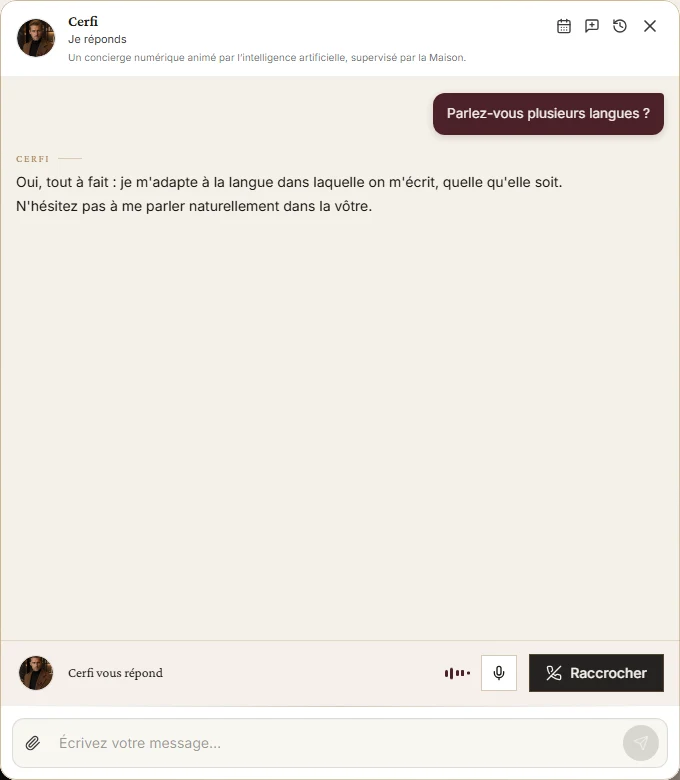
The panel’s voice bar. Real capture · www.cerfland.fr · 6 September 2026.
Secure context
Audio capture exists only in a secure context. On a page served over HTTP the panel reports unavailability — it does not say “blocked”, because that would be false.
What the panel says
“The microphone is blocked” appears only on a real refusal by the visitor. Any other cause shows an interruption message, and the conversation carries on in writing with nothing lost.
The precise diagnosis
For a precise diagnosis the panel root carries a data-voice-fail-stage attribute naming the exact stage: microphone unavailable, refusal, no input device, session refused, socket dropped.
The button does not appear
If the “Speak” button does not appear at all, that is not the installation: voice is your Maison’s decision — the surface published in your dashboard — crossed with your plan’s voice entitlement.
Verify
Open a page of your site on an authorised domain. The button appears in the corner, on the side published in your dashboard.
Click it: the panel opens. On a short screen it is limited to the height actually visible.
In your dashboard, on that installation’s row, “Last detection” fills in on its own.
Live
The script was loaded from an authorised domain within the last 48 hours.
Verified
The script has been observed on your site before, but not within the last 48 hours.
Script not detected
No load has ever been observed on an authorised domain.
The detection is stamped at most once every five minutes: reloading the page a second time within that window changes nothing on screen. It is the only proof of presence the platform holds — it measures neither your traffic nor the number of conversations, which are not attached to an installation.
Remove
They are not interchangeable. Two are undone freely, one is undone provided you paste the new line, one is final.
The act
What happens
Nothing loads any more. The installation stays in your account and its last detection ages.
Can it be undone
Yes — paste the line back.
The act
What happens
The key stops resolving. The loader receives nothing and inserts nothing: no button, no bubble. The line may stay in your page.
Can it be undone
Yes — reactivate it.
The act
What happens
A new key is issued and the old one stops resolving at the same second. The line already in place loads nothing.
Can it be undone
Yes — paste the new line.
The act
What happens
The key never resolves again and the row is kept for audit. Reactivation is refused by the server.
Can it be undone
No — a new installation must be created.
The first failures
Four causes account for very nearly every first installation. They share the trait that makes them disorienting: the product is designed to show nothing rather than show a dead button, so the failure is silent.
The cause
An installation is created PAUSED. That is the product’s choice: nothing shows on your site before you have decided it should. A revoked installation, or a restricted account, produce exactly the same silence — and if the frame had time to open, it asks the loader to remove itself entirely.
The act
Dashboard, Sites, your installation: “Activate the installation”.
Next
Every installation carries its line, its domains and its real state there. If any point in this document does not match what you observe, tell us: it is the document that is wrong.